

Back
SaaS Marketplace Apps vs Custom Integrations: Which Fits Your Support Stack?

Benny
- October 12, 2026
9 min read

Your customer support stack rarely consists of one platform.
A typical support environment may include a helpdesk such as Freshdesk, Zendesk, or Zoho Desk, alongside CRM systems, communication tools, review platforms, e-commerce applications, analytics tools, and internal business systems.
The challenge starts when these tools don't communicate effectively.
You may have customer data in your CRM, tickets in your helpdesk, reviews in another platform, and order information somewhere else. Without the right integration layer, agents can spend time switching between applications, manually transferring data, and searching for customer context.
This is where SaaS marketplace apps and custom integrations come into the picture.
But which approach is right for your support stack?
The answer depends on your integration requirements, level of customization, existing APIs, implementation complexity, scalability, and engineering resources.
In this guide, we'll compare both approaches and help you determine which one fits your support environment.
SaaS Marketplace Apps vs Custom Integrations: Quick Answer
Marketplace apps are generally a strong option when you need a proven integration that connects your support platform with an existing business application.
Custom integrations are better when your workflow has unique business logic, proprietary systems, or requirements that standard marketplace functionality cannot support.
The right decision isn't always about choosing one over the other.
In many support environments, you can use marketplace apps for common integration requirements and custom integrations where deeper customization is necessary.
What Are SaaS Marketplace Apps?
SaaS marketplace apps are applications or extensions built to operate within an existing SaaS ecosystem.
Platforms such as Freshworks, Zendesk, and Zoho provide marketplaces where businesses can discover applications that extend the functionality of their support platforms.
For example, a support team may need to connect its helpdesk with:
- CRM platforms
- Review platforms
- E-commerce applications
- Communication tools
- AI services
- Productivity applications
- Marketing platforms
Instead of building every connection from scratch, a marketplace app can provide a ready-to-deploy integration.
From a technical perspective, marketplace applications can work with platform APIs, OAuth, webhooks, SDKs, events, and application frameworks to exchange data and trigger workflows.
This can make them particularly useful when your requirement aligns with an existing integration pattern.
What Are Custom Integrations?
A custom integration is designed specifically around your business requirements.
Instead of using a predefined marketplace application, your integration team develops the architecture, API connections, data mapping, authentication, business logic, error handling, and workflow behavior required by your environment.
For example, you may need a helpdesk to communicate with a proprietary internal application that has a private REST API.
A custom integration could handle:
- API authentication
- Data transformation
- Payload mapping
- Webhook events
- Business rules
- Workflow automation
- Error handling
- Data synchronization
- Custom UI requirements
The biggest advantage is flexibility.
The trade-off is that custom integrations usually require more development, testing, maintenance, and engineering ownership.
5 Factors to Consider Before Choosing
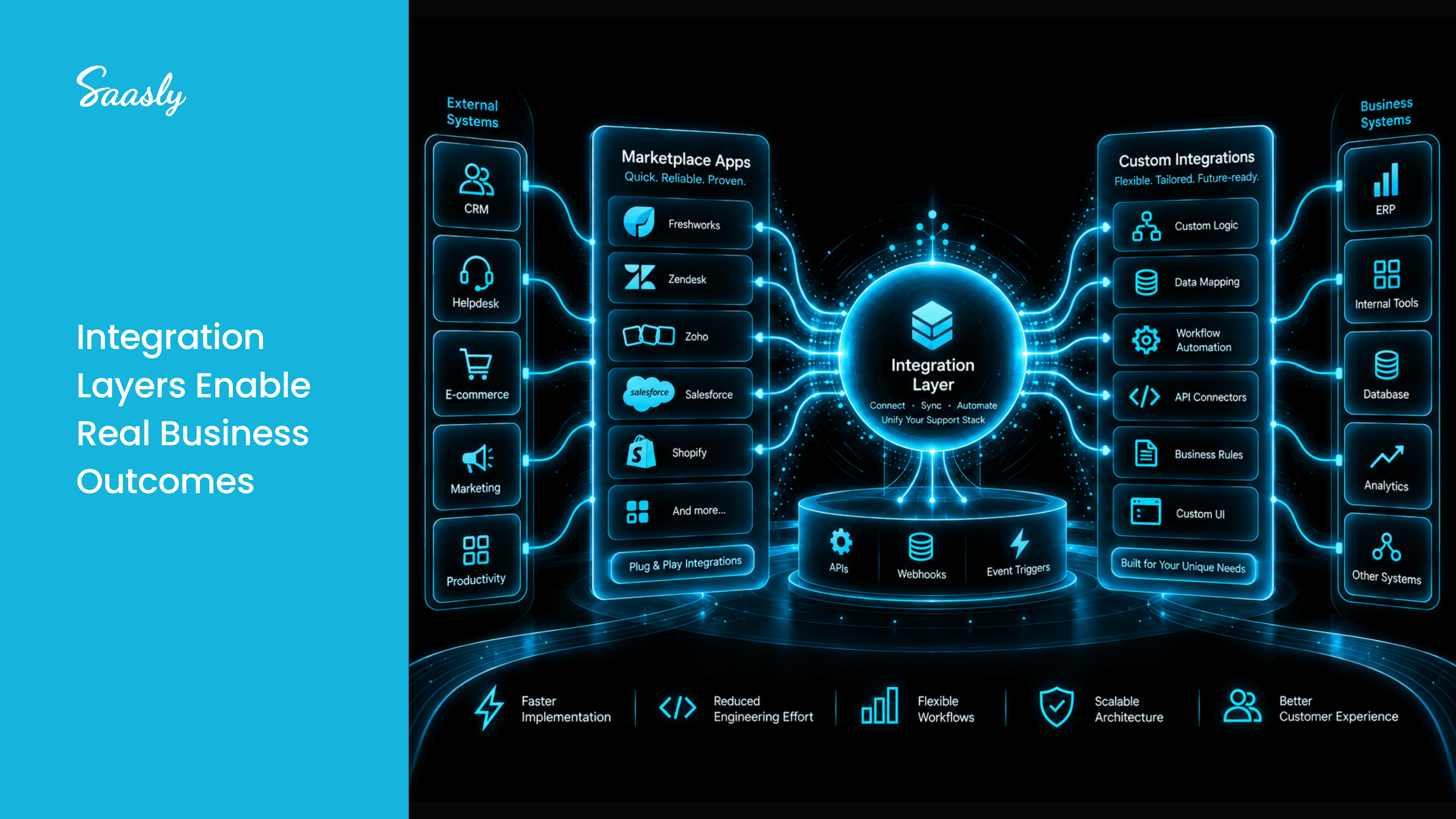
1. Integration Requirements
Start with the actual problem you need to solve.
If you need a standard connection between your helpdesk and an established SaaS application, a marketplace app may provide the functionality you need.
If you have complex business rules or need to connect with proprietary systems, custom integration may be more appropriate.
Ask:
Can an existing marketplace app support 80–90% of my workflow requirements, or do I need a completely different integration architecture?
2. Customization
Marketplace apps typically work within the capabilities and configuration options supported by the application.
That can be an advantage because you don't have to design every component yourself.
However, your support workflow may require specific data transformations, conditional logic, custom triggers, or proprietary business rules.
That's where custom integration becomes more valuable.
For example:
Ticket Created → Validate Customer → Retrieve CRM Data → Check Subscription → Apply Priority → Trigger Workflow
If the marketplace app cannot support this sequence, a custom integration may be necessary.
3. Engineering Resources
Your engineering capacity is another important consideration.
Building a custom integration means handling development, API documentation, authentication, testing, deployment, monitoring, and maintenance.
Marketplace applications can reduce the amount of engineering work required for supported use cases.
This doesn't mean marketplace apps eliminate technical work completely. You still need to evaluate permissions, configuration, security, compatibility, and implementation requirements.
The question is:
Where should your engineering team spend its time?
If integration development is taking resources away from core product initiatives, an existing marketplace application may be worth evaluating.
4. Time-to-Market
Time-to-market can become critical when support teams need an integration quickly.
A custom integration may involve:
Requirements → Architecture → Development → Testing → Deployment → Maintenance
A marketplace application can potentially shorten this implementation path when the required functionality already exists.
For SaaS businesses, this can mean getting a required workflow operational sooner without starting the entire integration lifecycle from scratch.
5. Maintenance and Scalability
Integration work doesn't end after deployment.
APIs change. Authentication methods evolve. Webhooks are updated. SaaS platforms release new versions and capabilities.
With custom integrations, your team or integration partner needs to manage these changes.
Marketplace apps also require maintenance, but the marketplace application provider typically owns the application lifecycle.
As your support stack grows, this distinction becomes important.
You should evaluate not only:
"Can we build this?"
but also:
"Can we maintain this reliably as our technology stack evolves?"
Marketplace Apps vs Custom Integrations: Comparison
| Factor | Marketplace Apps | Custom Integrations |
|---|---|---|
| Development effort | Usually lower | Usually higher |
| Time-to-market | Potentially faster | Depends on scope |
| Customization | Platform-dependent | High |
| Engineering involvement | Lower for supported workflows | Higher |
| Business logic | Depends on app capabilities | Highly customizable |
| Proprietary systems | May have limitations | Better suited |
| Maintenance | App provider typically manages updates | Internal team/partner responsibility |
| Scalability | Good for supported use cases | Depends on architecture |
| Best suited for | Standard integrations | Unique workflows |
When Should You Choose a Marketplace App?
A marketplace app may be the better choice when:
- Your integration requirement is common
- The required application already has a marketplace extension
- You want faster implementation
- You want to reduce development effort
- Your workflow fits the available functionality
- You prefer a maintained application
For example, if your support team needs to connect a helpdesk with an established CRM, review platform, or business application, an existing marketplace solution may be a practical starting point.
When Should You Choose a Custom Integration?
Custom integration is worth considering when:
- You have proprietary applications
- Standard marketplace functionality isn't sufficient
- You require complex business logic
- Multiple systems need to be orchestrated
- You require custom data transformation
- You need specific API or webhook behavior
- Your workflow is unique to your business
In these cases, flexibility can be more important than implementation speed.
Can You Use Both?
Absolutely.
Your support stack doesn't have to follow a single integration model.
You might use marketplace apps for common SaaS applications while developing custom integrations for proprietary systems.
For example:
Zendesk + CRM → Marketplace App
Zendesk + Internal ERP → Custom Integration
Zoho Desk + Review Platform → Marketplace App
Freshdesk + Proprietary Business System → Custom Integration
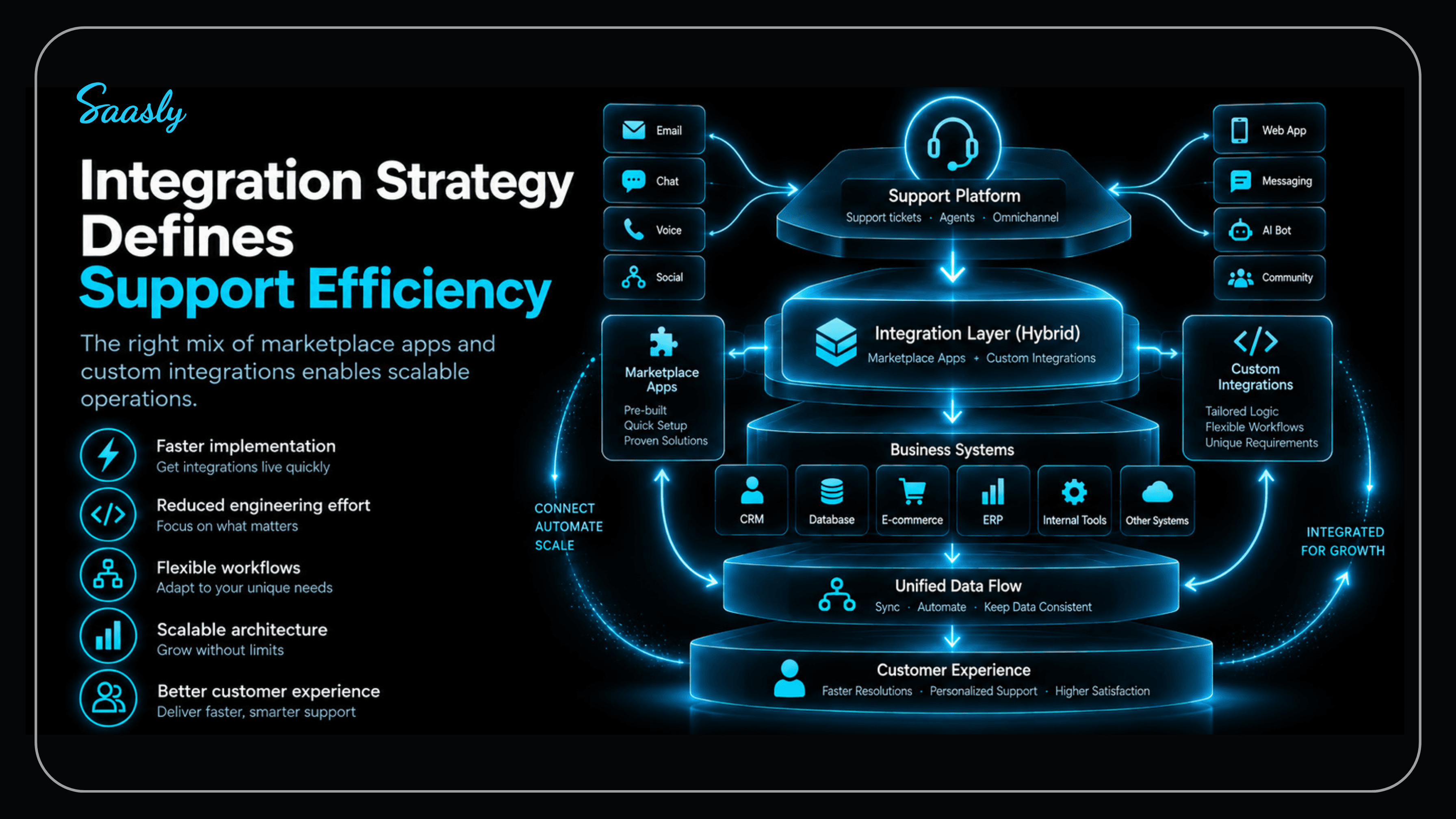
This hybrid approach can help you balance speed, flexibility, engineering effort, and maintainability.
How Saasly Can Help
Saasly works across SaaS ecosystems including Freshworks, Zoho, and Zendesk, with experience developing applications and integrations that extend support platforms into broader business workflows.
From CRM and review platforms to AI, e-commerce, productivity, and communication tools, the right integration approach depends on your existing stack and business requirements.
You can explore Saasly's SaaS and CPaaS integration capabilities and learn more about our integration-focused work through the Saasly blog.
The goal isn't simply to connect two systems.
It's to build a support stack where customer data, applications, and workflows can work together with less manual effort.
Conclusion
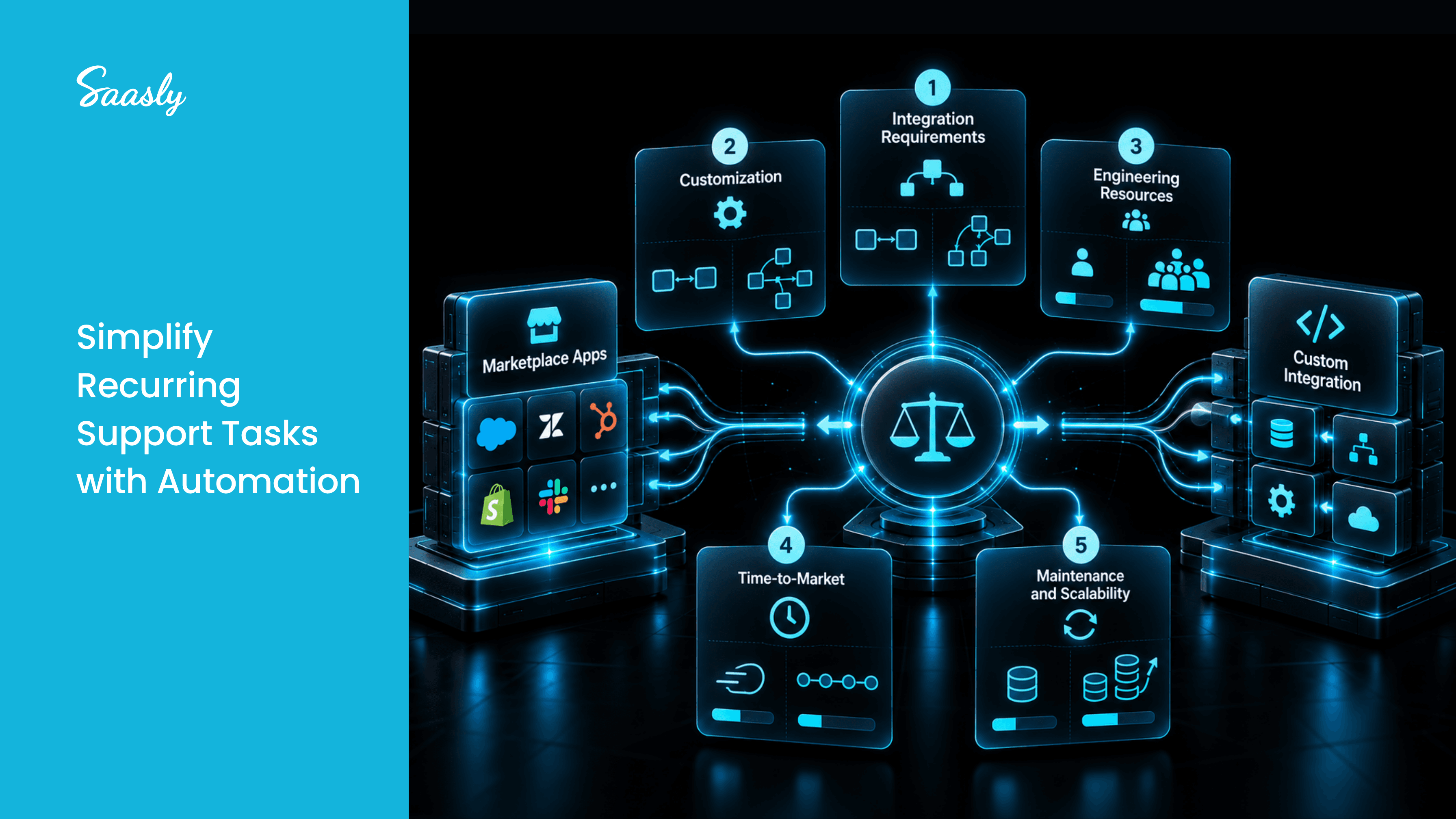
Choosing between a SaaS marketplace app and a custom integration isn't simply a technical decision.
You need to consider:
Requirements → Customization → Engineering effort → Time-to-market → Maintenance → Scalability
Choose a marketplace app when your requirements align with an existing solution and you want a faster, more maintainable path.
Choose custom integration when your workflows require deeper customization, proprietary systems, or specialized business logic.
And when your support environment contains both standard and unique requirements, a hybrid integration strategy may be the most practical approach.
The real question isn't:
"Marketplace app or custom integration?"
It's:
"Which integration approach gives your support stack the right balance of speed, flexibility, and scalability?"
Frequently Asked Questions About SaaS Marketplace Apps and Custom Integrations
What is a SaaS marketplace app?
A SaaS marketplace app is an application or extension designed to integrate with a SaaS platform such as Freshworks, Zendesk, or Zoho and extend its functionality.
Are marketplace apps better than custom integrations?
Neither approach is universally better. Marketplace apps can be suitable for standard integration requirements, while custom integrations provide greater flexibility for unique workflows and proprietary systems.
When should you build a custom support integration?
Consider a custom integration when you need complex business logic, proprietary system connectivity, specialized data mapping, or functionality that isn't available through existing marketplace applications.
Do marketplace apps require API integrations?
Many marketplace applications use platform APIs, SDKs, webhooks, authentication mechanisms, or other integration technologies to exchange data and extend platform functionality.
Can marketplace apps and custom integrations work together?
Yes. A hybrid approach can use marketplace apps for common SaaS integrations and custom integrations for specialized or proprietary workflows.
How do you choose the right integration approach?
Evaluate your functional requirements, customization needs, engineering resources, implementation timeline, API capabilities, maintenance requirements, and long-term scalability before making a decision.
Ready to Build or Implement Your SaaS Integration?
Whether you need a marketplace app, custom integration, or a combination of both, the right architecture starts with understanding your support workflow and integration requirements.
Talk to our integration experts → Contact Saasly