

Back
OpenAI Agents API: Run Cloud Agents Without Building the Infrastructure

Bobert Gomez
- October 12, 2026
5 min read

Introduction
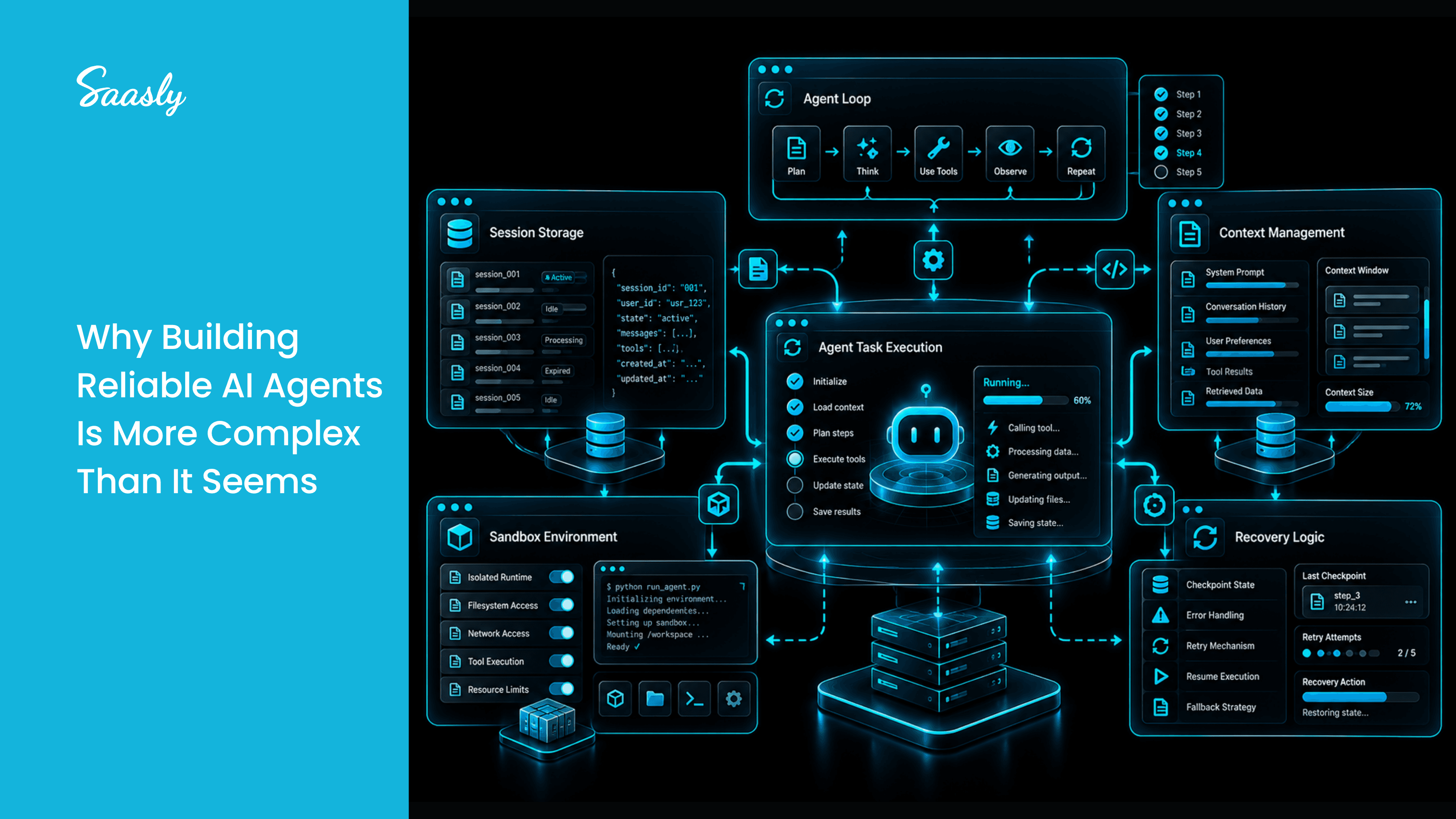
Building an AI agent that works for a few seconds is easy. Building one that runs for hours, writes code, edits files, survives failures, and picks up where it left off is much harder.
Until now, developers had to build the hard parts themselves: the agent loop, session storage, context management, sandboxes, and recovery logic.
OpenAI's Agents API, released in public beta in September 2026, takes most of that work off your plate. This post explains what it is, how it works, and when to use it.
What Is the Agents API?
The Agents API is a managed service that runs your agent on the same harness that powers Codex. OpenAI handles sessions, orchestration, context compaction, and recovery. You provide the task, the model, the tools, and the place where the agent works.
Think of it as: "Define the agent, and OpenAI runs it for you."
The Four Building Blocks
| Concept | What it means |
|---|---|
| Agent | The model, instructions, tools, and MCP servers it can use |
| Environment | An optional sandbox where it runs code, edits files, and loads skills |
| Session | A durable agent instance that works on tasks and remembers its progress |
| Events and items | The inputs you send and the output the agent produces |
How It Works
- Create a session: configure the agent, and OpenAI sets up its environment.
- Give it a task: your input starts a turn of work.
- Follow progress: stream the output, or use webhooks to be notified when it finishes or needs input.
- Continue or steer: send a new task to the same session, or guide the agent while it's working.
Your app sends input and receives events. OpenAI does the rest.
Where Should the Agent Run?
This is the biggest design decision you'll make:
- OpenAI-hosted sandbox: the fastest way to start
- Self-hosted sandbox: runs inside your own infrastructure
- Partner sandboxes
- No sandbox: for agents that only use tools
Real-World Uses
OpenAI's own examples show what it's good for:
- An incident response agent that investigates alerts and asks for approval before acting
- A Slack bot that handles requests using connected tools
- A data analyst that answers questions using read-only SQL
- A GitHub issue investigator that reproduces bugs
- A document reviewer that uses policy skills and specialist agents
Tips to Use It Efficiently
- Start in the hosted sandbox, then move to self-hosted if you need more control.
- Reuse sessions instead of starting fresh, since state is saved for you.
- Use webhooks for long tasks instead of waiting on open connections.
- Steer, don't restart, when the agent drifts off track.
- Cap subagents so parallel work doesn't surprise you on cost.
- Restrict sandbox network access to only what the agent needs.
- Require approval before risky actions like deletions or payments.
- Clean up old sessions and artifacts, and monitor usage with tracing.
Why Choose It?
- Less to build. No custom harness, session store, or recovery system.
- Made for long tasks. Sessions are durable and resumable.
- Flexible environments. Hosted, self-hosted, or partner sandboxes.
- Straightforward pricing. There's no separate fee for the API. You pay standard rates for model usage, tools, and hosted sandboxes.
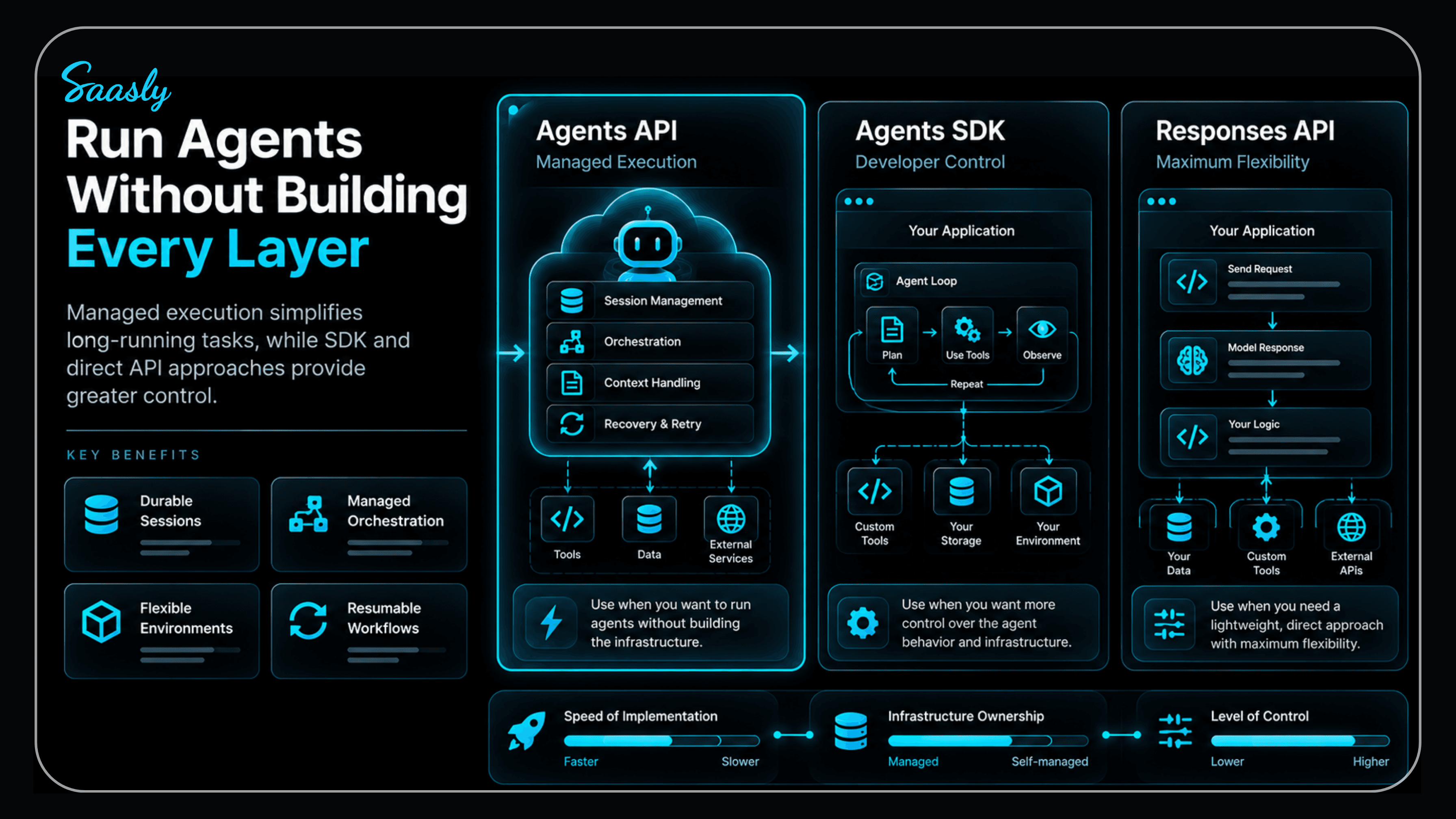
Agents API vs Agents SDK vs Responses API
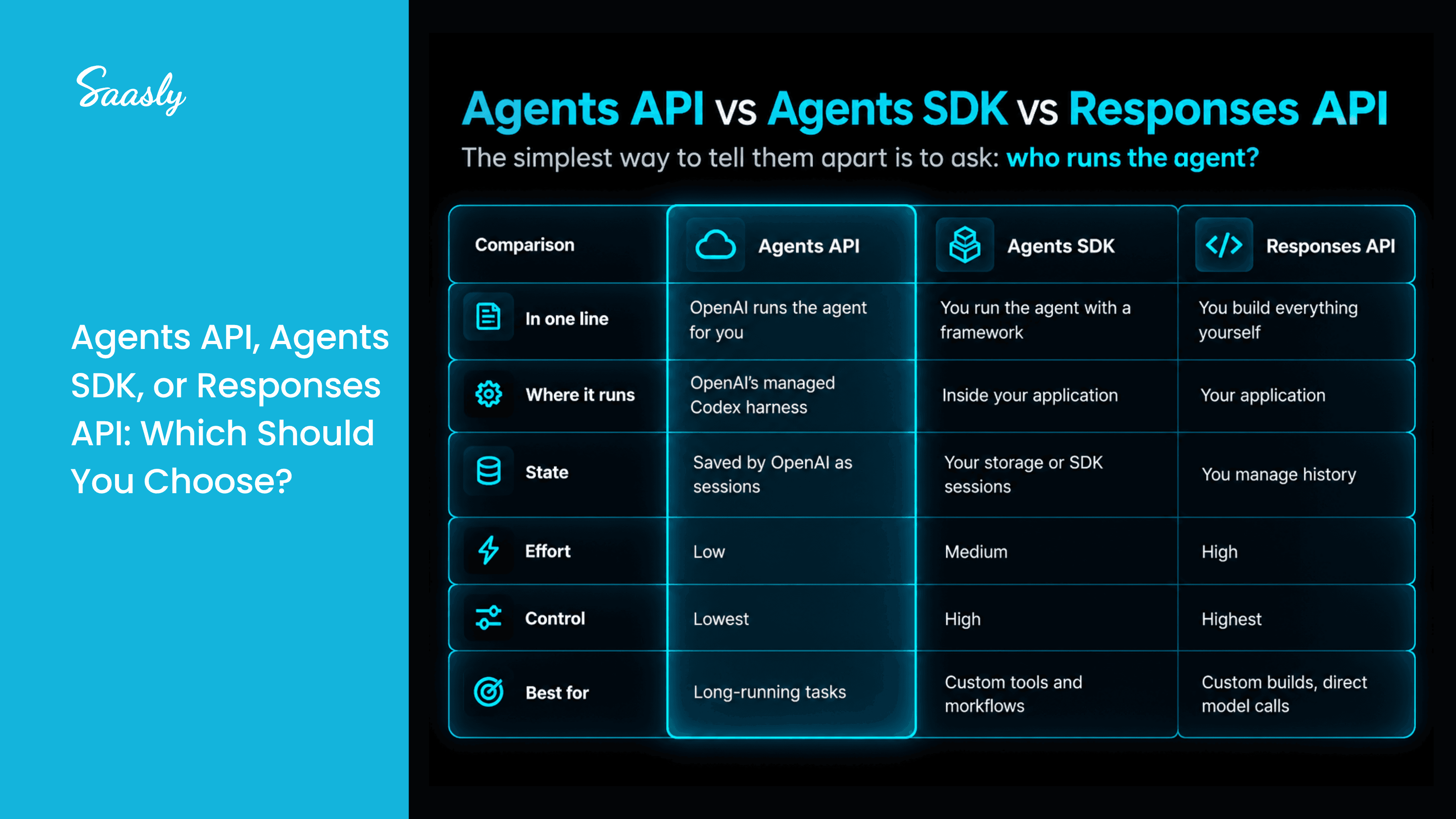
Pick the Agents API when you want speed and less infrastructure. Pick the SDK when you want to own the loop, storage, and approvals. Pick Responses when you want maximum control.
Things to Know Before You Start
- It's in beta, so details may change.
- Data residency is US-only, and Zero Data Retention is not supported, even with a self-hosted sandbox. This may rule it out for some regulated industries.
- There's some lock-in, since OpenAI manages your sessions and orchestration.
- Check sandbox billing carefully for long-running agents before scaling.
Conclusion
The Agents API removes much of the infrastructure work that makes production agents hard. If you need long-running, tool-using agents with minimal setup, it's a strong starting point. If you need full control or strict data rules, the Agents SDK or Responses API may fit better.
Start small, measure the results, and grow from there.
FAQs
1. What is the Agents API?
A managed service that runs agents on OpenAI's Codex harness, handling sessions, context, and recovery.
2. How is it different from the Agents SDK?
The SDK is a library you run inside your app. The Agents API is a hosted service where OpenAI runs the agent.
3. Is it free?
There's no extra platform fee. You pay for model, tool, and hosted sandbox usage at standard rates.
4. Is it production-ready?
It's in public beta, so test carefully and plan for changes.
5. Does it support MCP and multiple agents?
Yes, it supports MCP servers and subagents.