

Back
How to Manage Multiple Issues in a Single Freshservice Ticket

Arun
- November 5, 2026
8 min read

An IT support ticket may start with a simple request, but the conversation can quickly become more complicated. An employee might report a laptop issue and then mention a software access problem in the same ticket. Another user might report a network issue while also requesting a password reset.
Although these requests come from the same person, they may require different solutions, priorities, or teams. When multiple issues remain grouped in one ticket, IT support agents can find it harder to track progress, manage responsibilities, and ensure that every concern receives attention.
For teams using Freshservice, managing multiple issues in a single ticket requires a clear approach to ticket organization. Understanding when to keep requests together and when to separate them can help support teams maintain better visibility throughout the resolution process.
Why Do Multiple Issues in One Freshservice Ticket Become a Problem?
A single ticket can be convenient when an employee reports related symptoms. However, unrelated requests may require different handling. When these issues are managed together, several challenges can arise.
1. Different Issues Need Different Attention
Consider an employee who reports that their laptop is running slowly and requests access to a new business application. The laptop issue may require troubleshooting, while the access request may need approval.
These requests have different requirements. Treating them as one continuous issue can make it harder for agents to distinguish what needs to happen next.
2. Tracking Progress Becomes More Complicated
A ticket may appear to be in progress even when only one of the reported issues has been addressed. The remaining request can become less visible as the conversation grows.
Agents must review the conversation carefully to understand which problems have been resolved and which still need attention. This can add unnecessary effort to everyday ticket management.
3. Ownership Can Become Unclear
Different IT issues may require different specialists. For example, a hardware problem may need support from the desktop team, while an application access request may require assistance from the application administrator.
When both requests sit within one ticket, coordinating responsibilities can become more difficult. Teams need a clear understanding of who is handling each issue and what remains outstanding.
4. Prioritization Can Be Difficult
Not every issue in a ticket has the same urgency. A critical system access problem and a routine software request may need different response priorities.
When unrelated issues are combined, the overall ticket may not clearly communicate the urgency of each individual request. This can make it harder for agents to organize their workload effectively.
How to Manage Multiple Issues in Freshservice
A structured ticket management approach helps IT teams decide how to handle requests without losing important context.
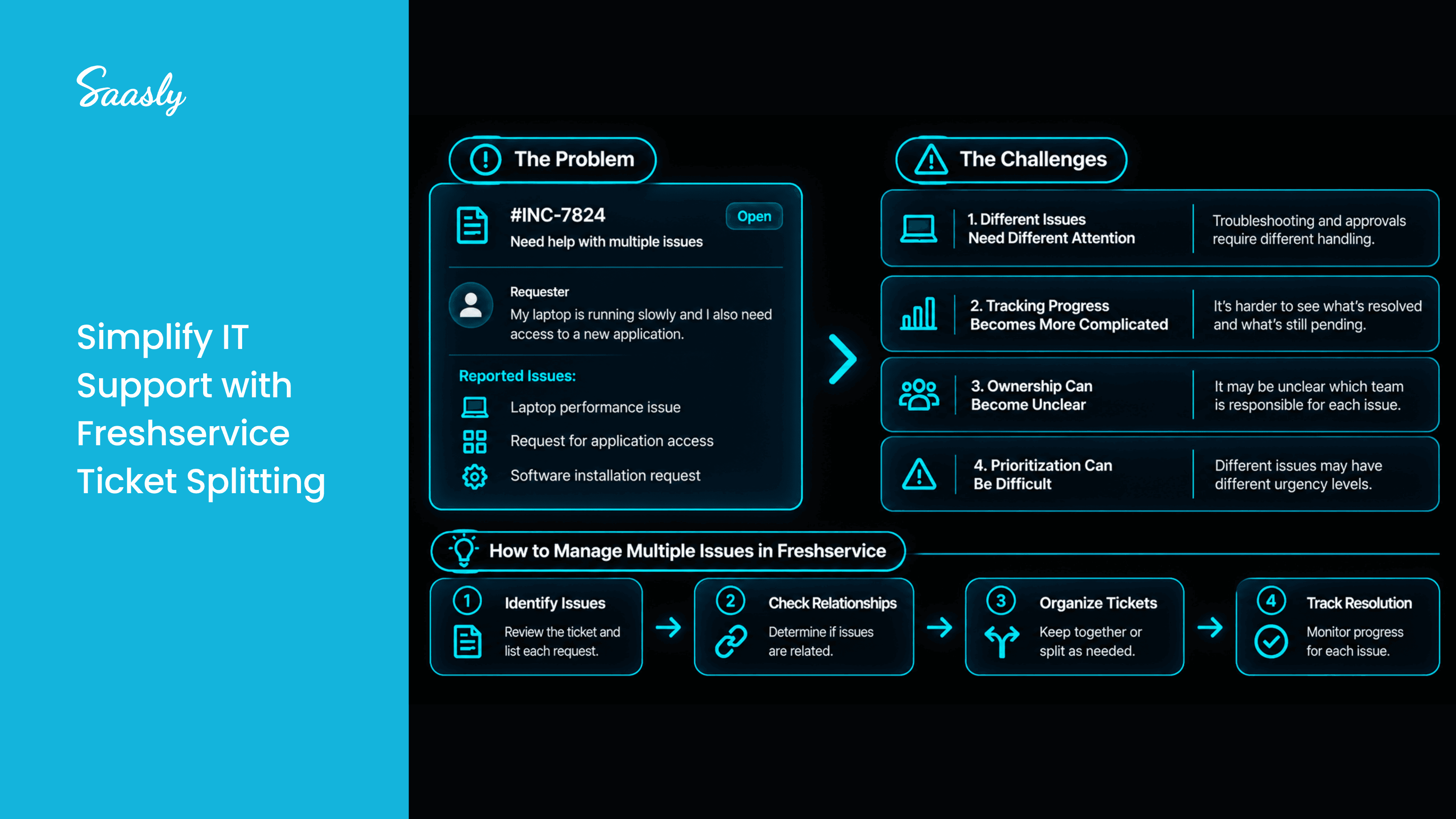
Step 1: Identify Each Issue Clearly
Start by reviewing the ticket conversation and identifying the distinct problems reported by the requester.
For example, a single ticket might contain:
- A laptop that will not connect to Wi-Fi.
- A request for access to a business application.
- A question about installing software.
Although all three requests come from one employee, they may require different troubleshooting steps and responsible teams.
Identifying each issue first helps agents understand the scope of the request before deciding how to manage it.
Step 2: Determine Whether the Issues Are Related
Not every ticket containing multiple symptoms needs to be separated. Several symptoms may be connected to the same underlying problem.
For example, a laptop that cannot connect to Wi-Fi and cannot access internal applications may have one common network-related cause.
Before separating requests, determine whether they represent different issues or different symptoms of the same issue. Keeping related information together can help agents understand the problem more effectively.
Step 3: Separate Unrelated Issues When Appropriate
When a ticket contains independent requests that require different handling, splitting the ticket may be a useful option.
Separating unrelated issues can make each request easier to identify and manage. It also helps support teams focus on the specific problem they are working to resolve.
Freshservice teams can explore the Split Ticket app, published by Spritle Software, for ticket-splitting needs. The app is positioned around improving IT support efficiency and organization by allowing tickets to be split.
Before adopting any ticket-splitting workflow, confirm the app's supported behavior and requirements for your Freshservice environment.
Step 4: Review Outstanding Requests
After deciding how to organize the issues, check that each request has a clear next step.
Agents should be able to identify which problems still require investigation, which are waiting for information, and which have been resolved. A quick review helps reduce the risk of overlooking an outstanding concern.
Step 5: Keep Communication Clear
Ticket organization is only part of the process. Employees also need to understand what is happening with their requests.
Use clear communication to explain the next steps, request any missing information, and confirm when an issue has been addressed. When multiple requests are involved, clarity helps prevent confusion about which problem is being discussed.
When Should You Consider Splitting a Freshservice Ticket?
Splitting a ticket may be worth considering when:
- The requests are unrelated: Each issue can be investigated and resolved independently.
- Different teams are involved: Separate requests need attention from different IT specialists.
- The resolution paths differ: One issue requires troubleshooting while another requires approval or provisioning.
- Progress is difficult to track: Resolving one problem should not obscure another outstanding request.
- Priorities differ: The issues need to be evaluated and managed separately.
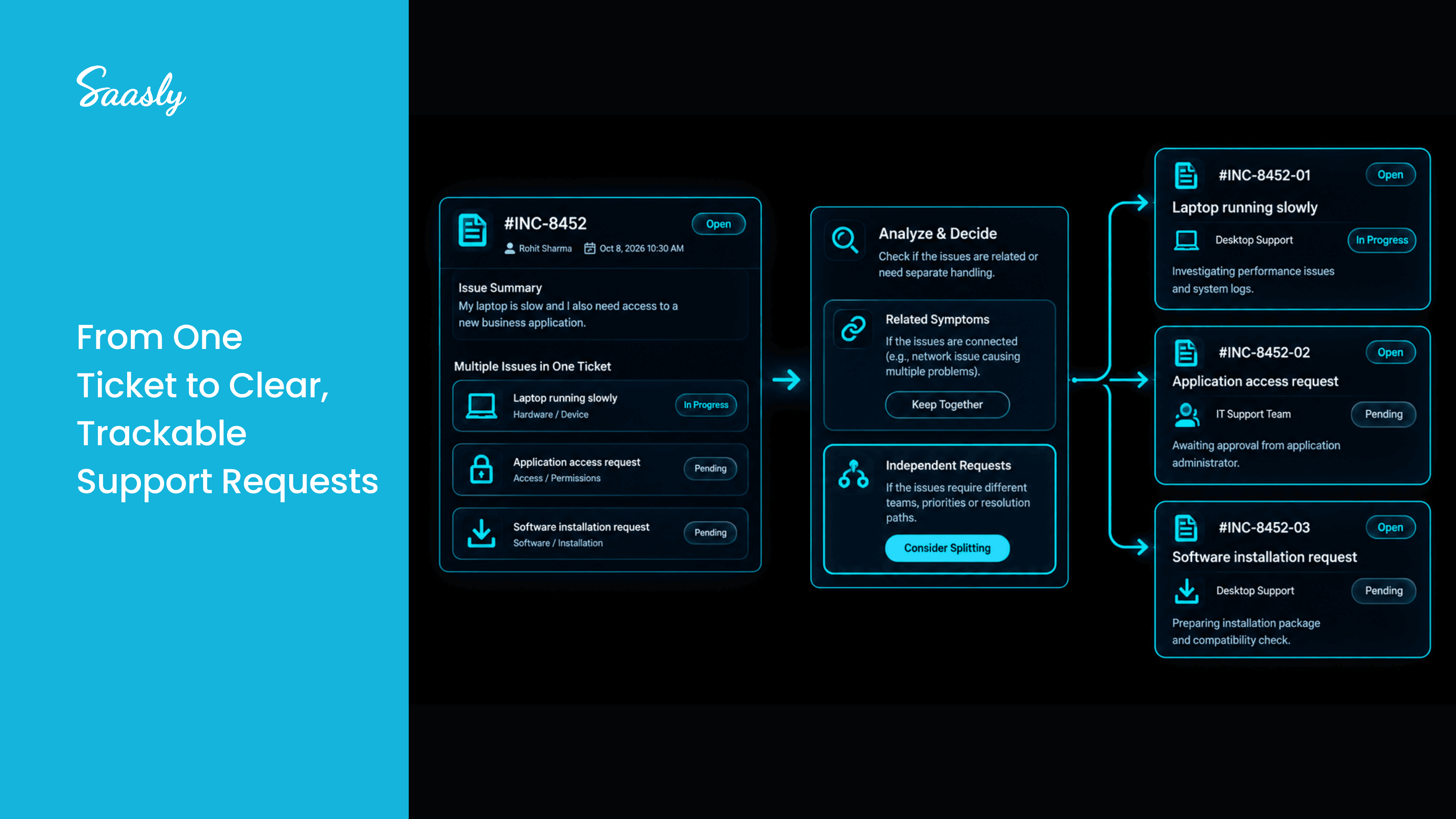
These are decision-making guidelines, not a rule that every multi-issue ticket must be split. The right approach depends on the relationship between the issues and your team's support processes.
Improve Ticket Organization With Split Ticket for Freshservice
Managing several unrelated issues within one ticket can create avoidable complexity for IT support teams. Identifying distinct requests, evaluating their relationship, and choosing an appropriate ticket structure can help teams maintain clearer workflows.
The Split Ticket app from Spritle Software is designed to support ticket splitting for Freshservice environments. Teams evaluating the app should review its listing and confirm that its supported functionality matches their ticket management requirements.
A well-organized ticketing process helps support agents focus on the issue at hand while keeping outstanding requests visible. The goal is not to create more tickets unnecessarily, but to make sure each issue receives the appropriate attention.
Conclusion
Managing multiple issues in a single Freshservice ticket can become challenging when requests require different teams, priorities, or resolution paths. By identifying distinct issues, determining whether they are related, and splitting tickets when appropriate, IT support teams can make their workflows easier to follow.
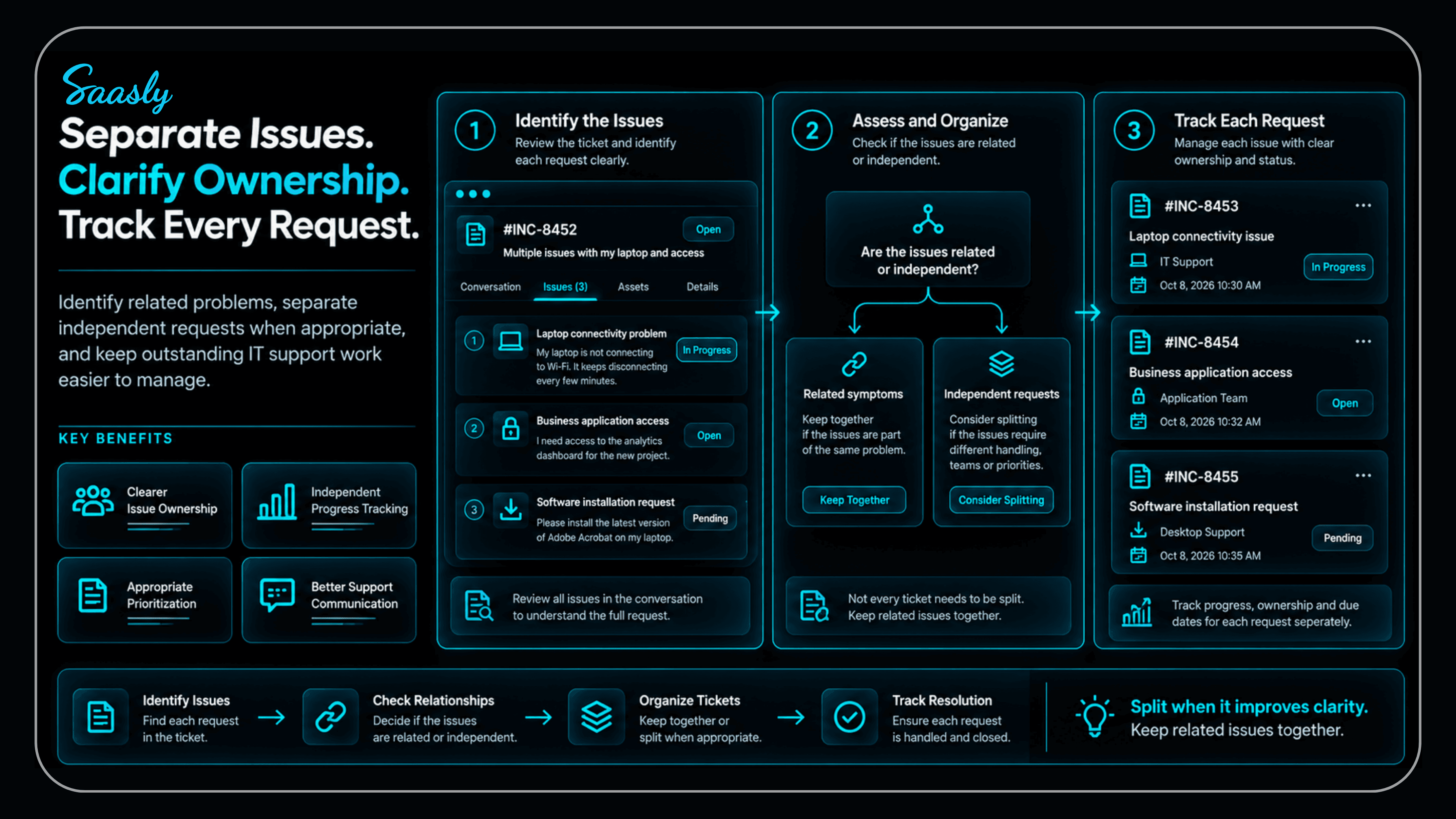
A thoughtful approach to ticket organization helps agents track outstanding work, clarify responsibilities, and communicate more effectively with employees.
Looking to improve your IT support workflows? Contact Saasly to discuss your requirements and explore solutions that fit your Freshservice environment.
Frequently Asked Questions
1. What does it mean to split a Freshservice ticket?
Splitting a ticket means separating issues that were reported together so they can be managed independently when appropriate. The exact process and available options depend on the Freshservice functionality or app being used.
2. Why should IT teams separate unrelated support issues?
Unrelated issues may require different teams, priorities, approvals, or troubleshooting steps. Separating them can make ownership and progress easier to track.
3. Should every ticket containing multiple issues be split?
No. If the reported problems are connected and share the same underlying cause, keeping them together may be more useful. Splitting is worth considering when the requests are independent and need separate handling.
4. What is the Split Ticket app for Freshservice?
Split Ticket is an app published by Spritle Software and listed on the Freshworks Marketplace. It is positioned to help improve IT support efficiency and organization through ticket splitting.
5. How can IT teams improve ticket management in Freshservice?
Teams can identify issues clearly, assess whether requests are related, establish clear ownership, review outstanding work, and communicate next steps to requesters. Ticket-splitting tools may also help when unrelated requests need to be managed separately.