

Back
Zendesk App Builder: Turning Prompts Into Installed Apps

Karthikeyan R
- November 24, 2026
10 min read

Introduction
I needed a small internal tool: a table to track ticket assignee changes, with a refresh button and an option to export data to Excel.
Previously, building something like this would have required creating a development ticket, securing a place in the sprint, and potentially waiting two weeks for delivery.
Instead, I described what I wanted in Zendesk's App Builder, and it generated the app.
That experience prompted me to explore how the tool works, what it can do, and where its limitations lie.
What Is Zendesk App Builder?
Zendesk App Builder lets you create apps that extend Zendesk and support your organization's customer service workflows.
It uses natural-language instructions and generative AI to produce application code, user interfaces, and functionality without requiring you to build everything from scratch.
You don't necessarily need coding experience to get started, but you must be a Zendesk administrator to build apps. Once published, authorized agents and administrators can use them.
In short, you describe what you need, generate an app, refine it, and publish it.
Understanding the Building Blocks
App Builder uses a few core components:
- Conversation: An ongoing exchange where you describe your app and refine its functionality.
- Prompt: Each prompt can contain up to 50,000 characters, with a maximum of 200 messages per conversation.
- App Designer: Presents up to three AI-recommended layouts to preview before building.
- App: The generated application that can be tested, published, installed, and versioned.
- File Uploads: Supports up to five files per prompt in formats such as PNG, JPG, TXT, DOCX, PDF, CSV, JSON, and Markdown, providing additional context for the AI.
Together, these components take you from an initial idea to a functional Zendesk app.
How Zendesk App Builder Works
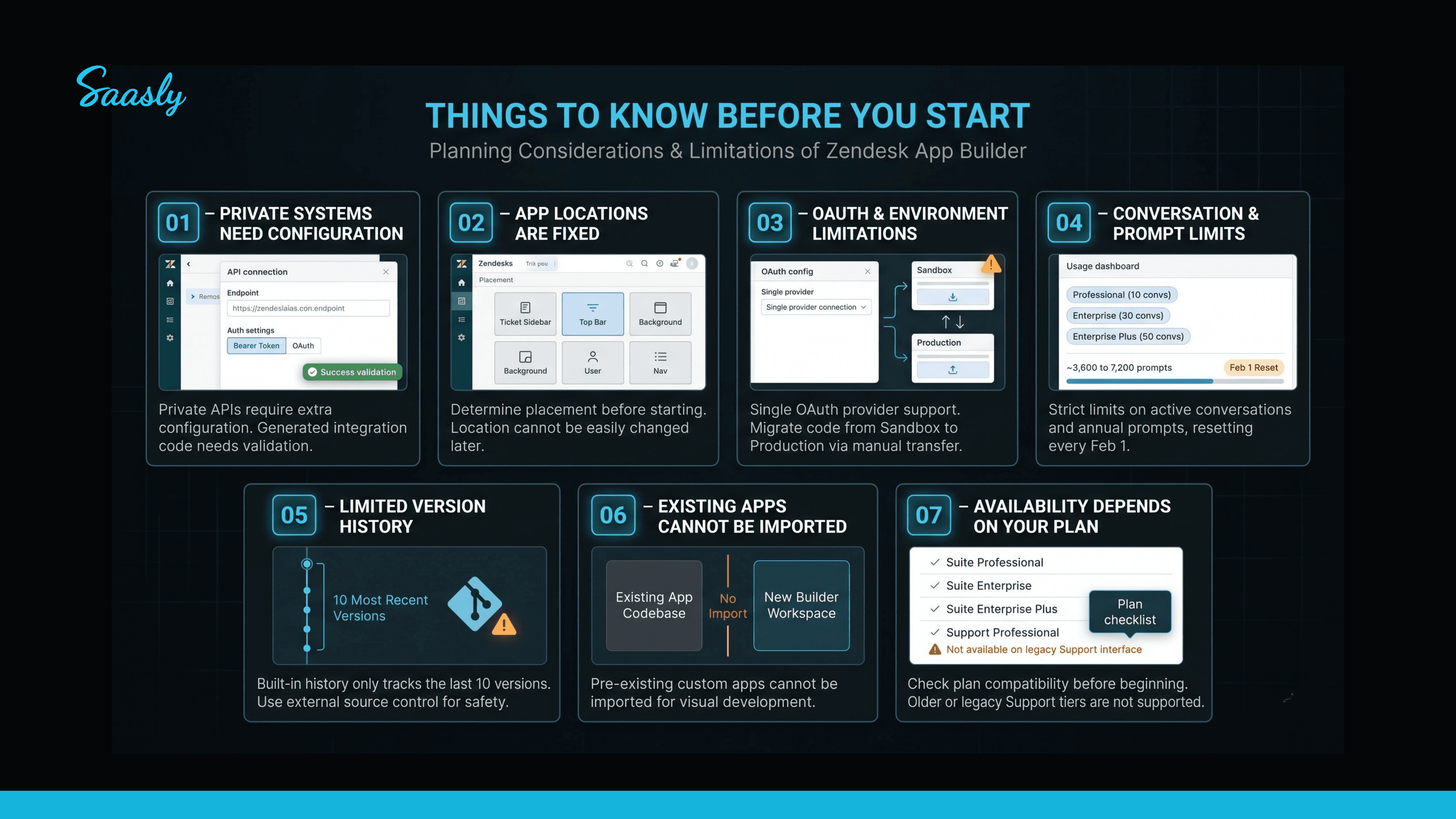
Step 1: Start a Conversation
Navigate to Admin Center → Apps and integrations → Apps → App Builder → Start a conversation.
This opens the workspace where you describe the app you want to create.
Step 2: Choose the App Location
Zendesk App Builder supports six locations:
- Ticket Sidebar
- New Ticket Sidebar
- User Sidebar
- Organization Sidebar
- Top Navigation
- Side Navigation
You must select the location when starting the conversation. Choose carefully, as you cannot change it for that conversation afterward.
Step 3: Describe Your Requirements
Write a prompt explaining the app's functionality and expected behaviour.
For example, you could request a ticket management widget that displays assignee changes, includes a refresh button, and exports the information to Excel.
You can also attach supporting files. Clear requirements covering functionality, layout, and user interactions help the AI generate a more suitable result.
Step 4: Review the Plan and Preview
Before building, review the proposed implementation plan. You can request adjustments, explore suggested layouts, or select Build now.
Once generated, the app provides two useful views:
- Preview: Shows the interface using mock data.
- Code: Lets you inspect the generated source files.
Step 5: Refine the App
If the initial result doesn't meet your expectations, provide additional instructions to improve the interface or functionality.
You can also modify the generated code directly. App Builder maintains version history and provides an option to restore earlier versions.
Step 6: Test and Publish
Test the app against data from your actual Zendesk account before publishing.
Important: This is not a sandbox environment. Testing can affect live tickets, users, and other production data.
Once testing is complete, publish the app and configure the appropriate user roles and groups to control access.
What's Inside a Generated App?
App Builder generates a structured codebase rather than a completely closed no-code application.
A typical app may contain:
- blueprint.md: Documents the app's architecture, features, and technologies.
- changelog.md: Records changes and supports version tracking.
- index.jsx: Main entry point for the React application, including loading states and error handling.
- mock.js: Provides mock data for previews.
- components/: Contains reusable React components.
- styles/: Contains styling resources.
- utils/: Contains helper functions and utilities.
Advanced users can inspect and modify individual files through the code editor.
The key advantage is that App Builder generates real React code that developers can inspect, customize, and extend.
How App Builder Handles Credentials
Applications connecting to external services often require API keys or OAuth credentials.
Embedding these secrets directly in application code can create security risks.
Zendesk App Builder supports secure credential settings and its application proxy. According to Zendesk's documentation, credentials can be stored as encrypted settings, scoped to permitted domains, and routed through the application proxy.
Supported authentication methods include:
- API key authentication
- OAuth 2.0, including client IDs, client secrets, authorization URLs, and token URLs.
Keep these precautions in mind:
- Never paste passwords, API keys, or access tokens into prompts.
- Store credentials through the appropriate secure settings workflow.
- Limit permissions to what the integration requires.
- Review how authentication and external API requests are handled.
Secure credential storage is important, but the complete integration must also be reviewed for appropriate permissions and data handling.
Real-World Apps I'd Build With It
App Builder is particularly useful for small tools that solve specific workflow problems.
1. Ticket Sidebar Widgets
Build a widget that retrieves order information from an external API and displays it directly inside a Zendesk ticket. Agents can check order status without switching between applications.
2. Ticket Reporting Dashboards
Create a dashboard in the top navigation that counts tickets matching specific conditions. Add filters and export functionality so teams can review and download relevant ticket data.
Things to Know Before You Start
Although App Builder makes development more accessible, several limitations are worth understanding.
1. Private Systems Need Additional Configuration
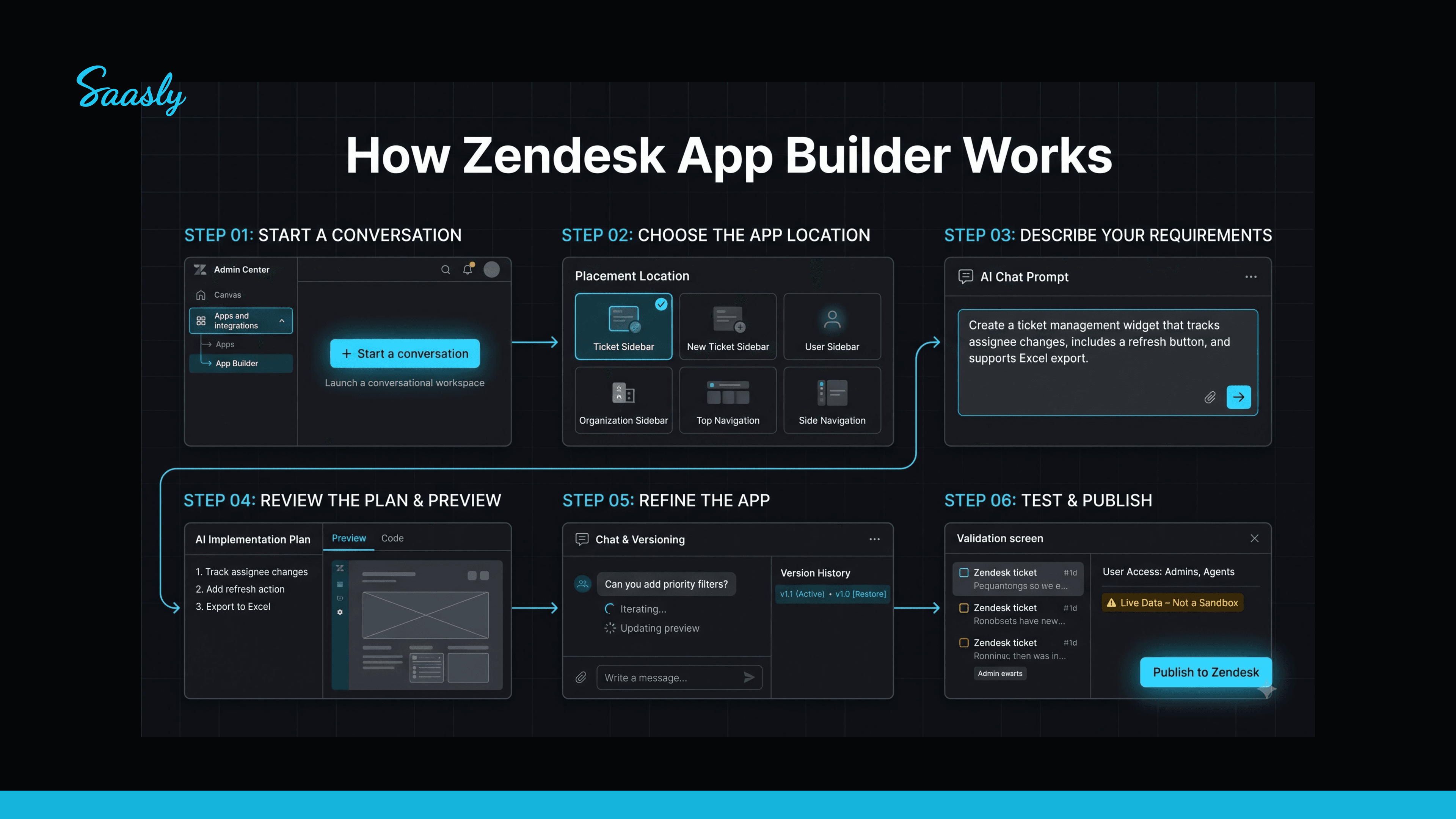
App Builder doesn't automatically understand your company's internal APIs or private systems.
You may need to provide endpoint details, authentication configuration, and implementation requirements. Generated integration code must still be validated.
2. App Locations Cannot Be Changed Freely
Each app is associated with one of the six supported Zendesk locations. Consider where users need the functionality before starting the conversation.
3. OAuth and Environment Limitations
The documented workflow supports one OAuth provider per app and doesn't provide a conventional sandbox-to-production promotion process.
Moving an app to another Zendesk instance involves downloading its compiled code and uploading it to the destination instance rather than transferring the original source files.
These constraints matter when planning deployment and maintenance.
4. Conversation and Prompt Limits
The documented conversation limits depend on your plan:
- Professional: 10 conversations.
- Enterprise: 30 conversations.
- Enterprise Plus: 50 conversations.
App Builder also has a documented annual prompt allowance of approximately 3,600 prompts, potentially increasing to around 7,200. The documented allowance resets on February 1, and usage visibility may be limited.
Check your current plan and account documentation, as these limits can change.
5. Version History Is Limited
The changelog retains only the ten most recent versions. Although restoring an earlier version is useful, this shouldn't replace an external source-control system for applications that require more comprehensive change tracking.
6. Existing Apps Cannot Be Imported
App Builder follows a conversation-based creation workflow. You cannot simply import an existing custom app and continue developing it inside the builder.
Teams already maintaining custom Zendesk applications should consider this limitation before adopting the tool.
7. Availability Depends on Your Plan
Documented availability includes eligible Suite Professional, Suite Enterprise, Suite Enterprise Plus, Support Professional, and corresponding eligible higher-tier Support plans.
App Builder isn't available through the legacy Support interface. Verify the current requirements in your Admin Center before planning a rollout.
Why I'd Use Zendesk App Builder
For small, focused internal tools, App Builder offers several advantages:
- Faster development: Reduce the wait for small workflow improvements.
- Editable source code: Customize generated React components when needed.
- Secure credential handling: Separate credentials from application code through supported settings.
- Version history: Track changes and restore recent versions.
- Native Zendesk access: Place functionality where agents already work.
These benefits make it useful for teams with a backlog of small improvements that may not justify a dedicated development cycle.
However, generated code still needs review, external integrations need testing, and production applications require appropriate security and maintenance.
Where I Landed
Zendesk App Builder isn't a replacement for an engineering team, particularly for complex integrations or business-critical applications.
Its prompt budget, version history, authentication requirements, and deployment limitations all need consideration.
However, for small internal tools that would otherwise remain on a backlog, it offers a practical alternative.
Instead of writing a detailed specification and waiting for a development sprint, you can describe the problem, generate an initial solution, refine it, test it, and publish it.
The generated code also gives developers the flexibility to extend the implementation when necessary.
My takeaway: App Builder is most valuable when you focus on specific workflow problems, keep the scope manageable, and validate the generated application before publishing it.
For the right use case, it can significantly shorten the path from idea to working tool.
Want to Build Better Zendesk Workflows?
From ticket management widgets to reporting dashboards and external integrations, custom apps can help reduce repetitive work and improve agent productivity.
If you're exploring ways to extend Zendesk with custom applications, the Spritle team can help you identify the right approach.
Talk to our Zendesk team: Contact Saasly
Frequently Asked Questions
1. Do I need coding experience to use Zendesk App Builder?
No. You can generate an app using natural-language prompts. However, reviewing and customizing its React code may require technical knowledge.
2. Where can a generated app appear in Zendesk?
Apps can appear in the Ticket Sidebar, New Ticket Sidebar, User Sidebar, Organization Sidebar, Top Navigation, or Side Navigation. Each app is associated with one location.
3. Can App Builder connect to external services such as Jira or Slack?
Yes, through supported APIs and authentication methods, including API keys and OAuth 2.0. Private systems may require additional backend configuration.
4. Are API keys safe in generated apps?
Zendesk supports encrypted credential settings and application proxy functionality. Never paste secrets into prompts; use the designated secure settings workflow.
5. Is there a limit to the number of apps I can publish?
The documented limitations focus on development conversations and annual prompt usage rather than a fixed number of published apps. Check your current account limits.
6. Can I import an existing Zendesk app?
The documented workflow doesn't support importing an existing app for continued development. Existing applications may require a separate maintenance or redevelopment approach.