

Back
Why Customer Support Tickets Get Lost Between Freshdesk and Asana

Krishna M
- November 24, 2026
5 min read

A customer writes in about a feature that stopped working. The agent confirms the problem in Freshdesk, copies the details into a new Asana task, and replies that the team is on it. Two weeks later the customer follows up. The ticket still says Pending, and the Asana task was completed days ago.
Nobody dropped the ball on purpose. The information lives in two places that don't talk to each other. This post explains why support tickets get lost between Freshdesk and Asana, what that costs, and what a more reliable handoff looks like.
Two tools built for two different jobs
Freshdesk is built around the customer conversation: tickets, replies, priorities, SLAs and agent queues. Asana is built around the work: projects, tasks, assignees, due dates and dependencies. Both do their own job well, and that is exactly where the trouble starts.
A ticket that needs help from engineering, product or operations has to cross from one model into the other. Crossing means turning a conversation into a task, and that translation is almost always done by hand. The agent decides what matters, retypes it, and hopes the task owner has enough to go on.
Meanwhile the ticket carries on in Freshdesk with its own status, its own clock and its own replies. From that point there are two records of one customer problem, and nothing keeps them in step.
Where tickets actually get lost
Most losses come from four small gaps:
- The copy-paste gap. The Asana task gets a one-line summary. Screenshots, account details and earlier replies stay behind in the ticket.
- The orphaned task. With no link back to the ticket, the task owner doesn't know a customer is waiting, or for how long.
- The silent update. The customer replies in Freshdesk after the task is created, or the project team posts progress in Asana, and the other side never sees it.
- The status mismatch. The task is marked complete in Asana while the ticket sits at Pending in Freshdesk, or the ticket is closed while the task is still open.
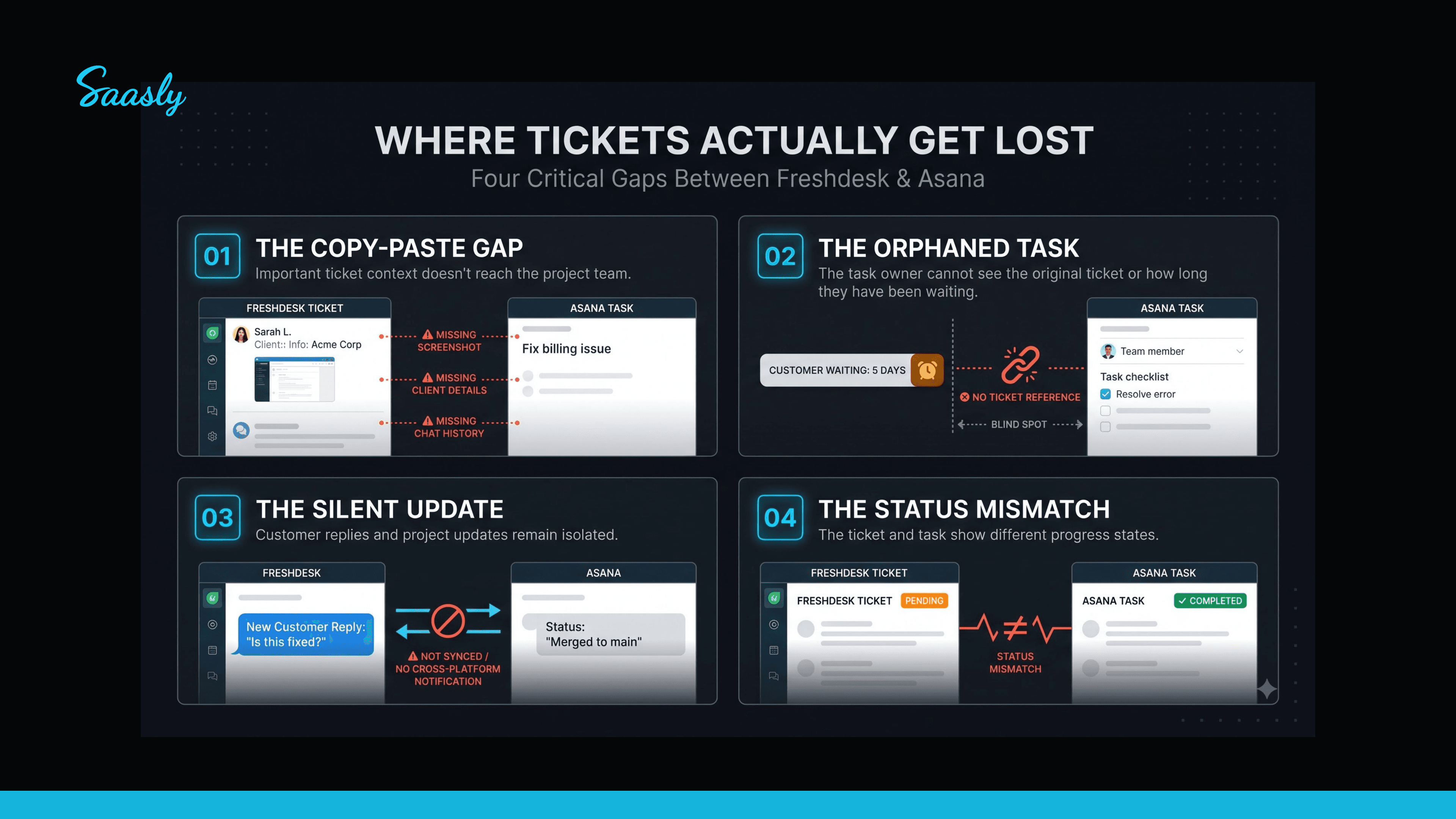
Each gap is minor on its own. Together they produce the familiar "any update on this?" message, usually at the worst possible moment.
What it costs
Customers feel it first. Waiting without news is worse than waiting with it, and a repeated follow-up tells them your teams aren't coordinating.
Agents pay next. Answering a simple status question means searching chat, opening Asana, asking a colleague, then going back to the ticket to reply. Those minutes rarely show up in a report because they are spread across the day.
Project teams pay in interruptions. When the ticket context isn't attached to the task, they get pulled into support threads to ask questions the agent already answered.
There is a quieter risk as well. The SLA clock keeps running in Freshdesk while the real progress happens in Asana, so a healthy-looking ticket can hide a stalled task, and a breached SLA can hide work that is nearly done.
The slowest cost is lost patterns. If several customers hit the same problem and each becomes a separate hand-typed task, nobody sees the count, and the fix gets prioritised late because the evidence is scattered.
How to make the handoff more reliable
You can improve this without changing any tools, by agreeing on a few rules:
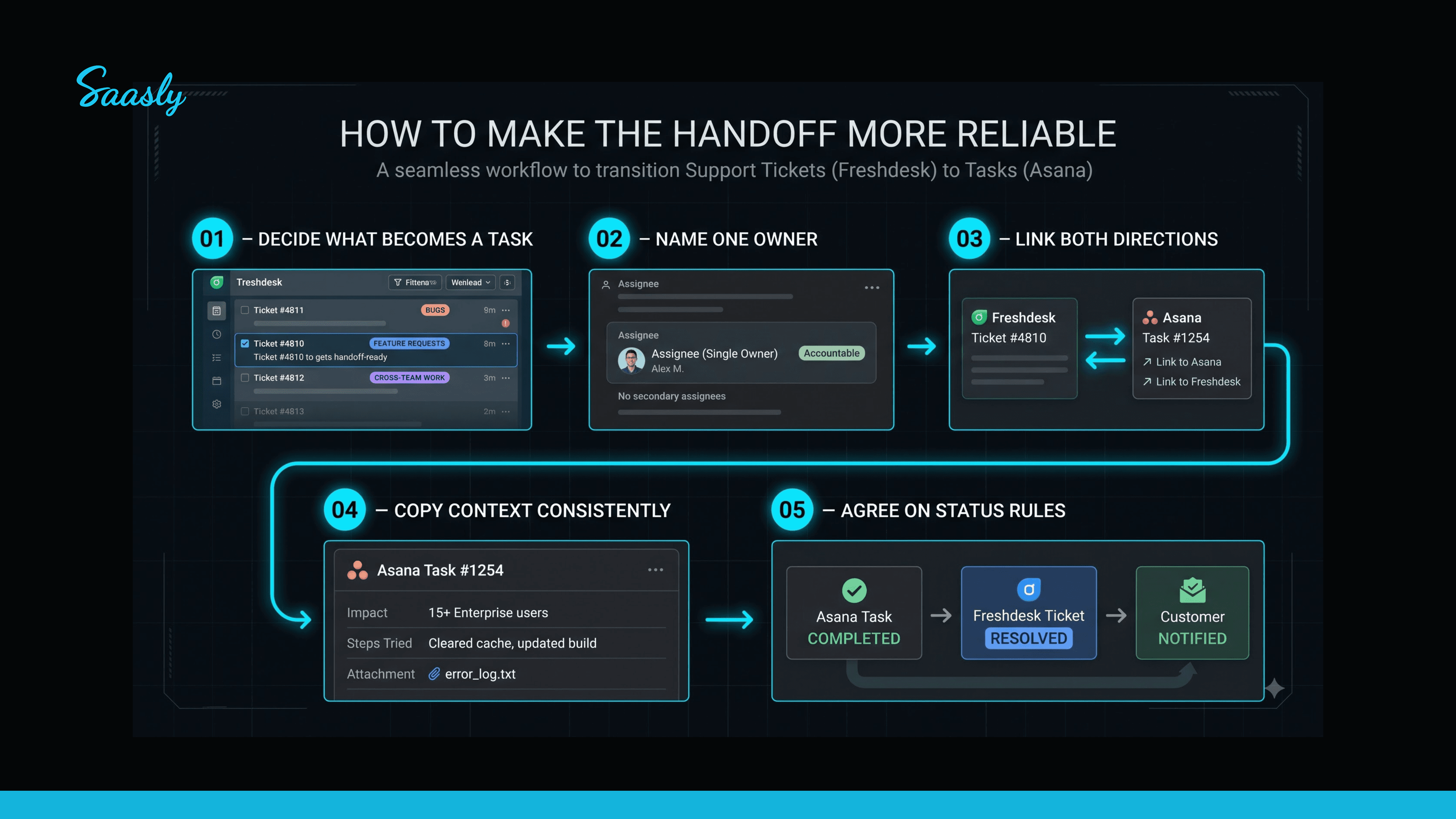
- Decide what becomes a task. Not every ticket needs one. Set simple criteria, such as bugs, feature requests, or anything that needs another team's work.
- Name one owner in Asana. A person, not a project or a channel.
- Link both directions. The ticket points to the task and the task points to the ticket.
- Copy context once, consistently. Customer impact, steps already tried and attachments go into the task in a standard format.
- Agree on status rules. For example, a completed task prompts the agent to update the ticket and tell the customer.
Manual rules add typing, which is why many teams eventually connect the two tools. Options range from native Asana widgets and marketplace apps (such as Asana by Saasly on the Freshworks Marketplace) to automation platforms. Whichever you choose, check whether sync is one-way or two-way, whether replies and comments travel with it, how fields map between a ticket and a task, and what the connection is allowed to see.
A quick self-audit:
- Can an agent find the Asana owner of any escalated ticket in under a minute?
- Does every escalated ticket link to a task, and every task back to a ticket?
- Do you know how many tickets became tasks last month?
- When a task is completed, does the ticket get updated?
Conclusion
Support tickets rarely get lost because someone stopped caring. They get lost because Freshdesk and Asana each hold half of the story, and people are left to stitch the halves together by hand. Naming an owner, linking the records and agreeing on what "done" means closes most of the gap, and a connection between the two tools can take care of the retyping.
If you're working out how to connect Freshdesk and Asana for your support and project teams, we're happy to talk it through. Reach us through our contact us form: saasly.in/contact-us